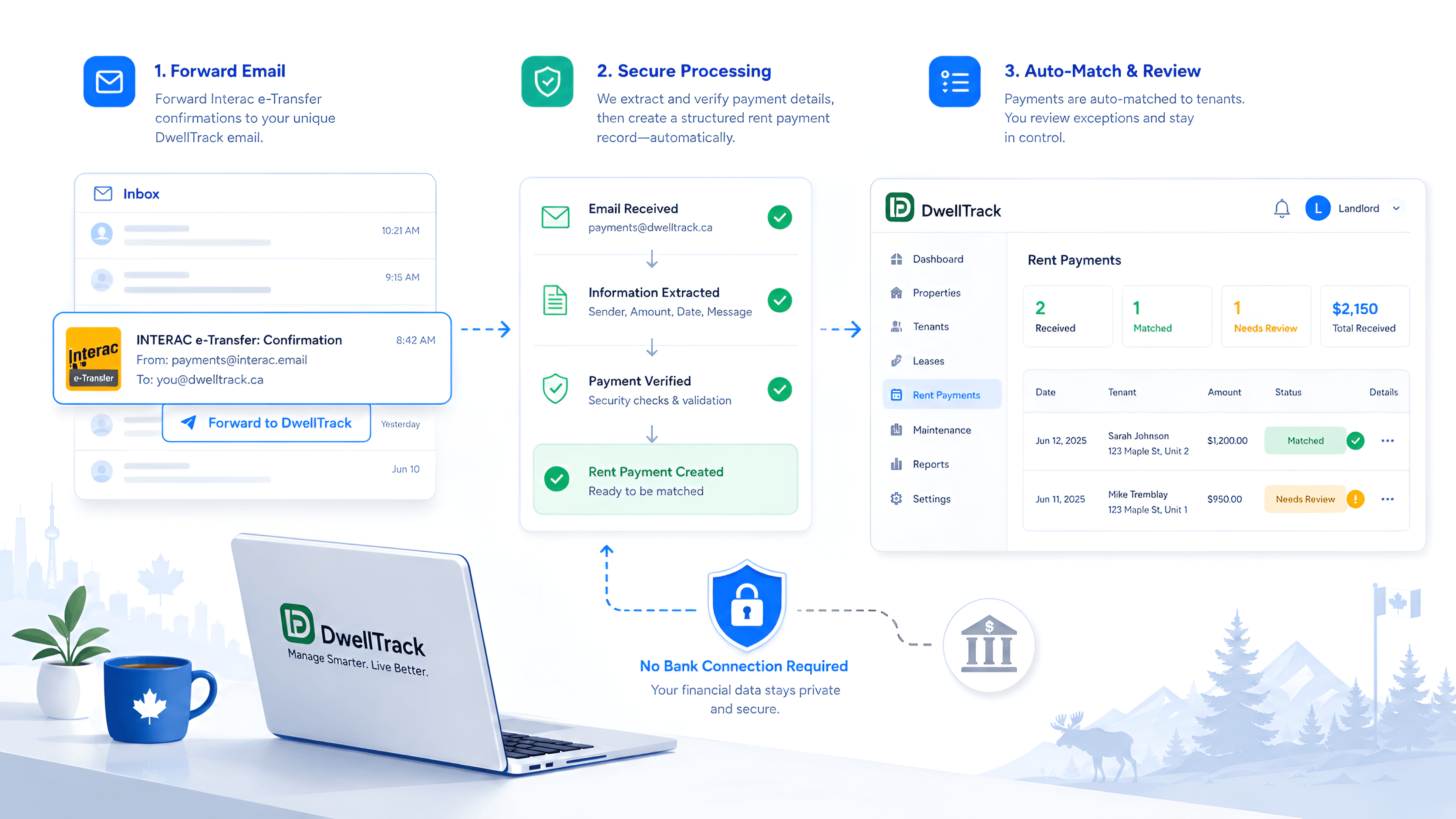
For many Canadian landlords, Interac e-Transfer is already the rent-payment system. The difficult part begins after the money arrives: identifying the sender, matching the amount to a tenant and unit, updating the ledger, and remembering which payment covered which month. DwellTrack's e-transfer rent tracking automates that work from the confirmation email itself.
Rent tracking should not begin with your bank password
Many financial tools start by asking you to connect a bank account. That can feel like a large privacy trade-off for a simple job: confirming that a tenant paid rent. It may also give the software a stream of unrelated transactions that have nothing to do with your rental business.
DwellTrack takes a narrower approach. It does not require a bank-account connection for e-transfer parsing. Instead, it works from the Interac e-Transfer confirmation emails you choose to forward. DwellTrack receives the information needed to organize the rent payment without needing access to your bank account or your full transaction history.
How email-based e-transfer parsing works
DwellTrack gives you a dedicated forwarding address. When an Interac confirmation arrives in your inbox, you forward it to that address, or create an email rule that forwards matching confirmations automatically.
The parser reads the relevant payment details, such as the sender and amount, then compares them with the tenants, leases, and expected rent already in DwellTrack. A strong match can be confirmed automatically. If something is unclear, DwellTrack puts the transfer in a review queue instead of quietly guessing.
You remain in control of the source. You decide which emails are forwarded, and a forwarding rule can be changed or removed from your email account at any time.
Why this is different from a bank feed
A bank feed is broad by design. It can contain grocery purchases, mortgage payments, personal transfers, subscription charges, and every other transaction moving through an account. DwellTrack's e-transfer workflow is intentionally focused on the rent confirmations you send it.
That focus makes the setup easier to understand: no bank login inside DwellTrack, no request to import months of unrelated activity, and no need to grant ongoing access to your bank-account data just to update a rent ledger.
This does not mean an email is magically risk-free. Landlords should still protect their email account with a strong password and multi-factor authentication. It means DwellTrack asks for less access because less access is enough to do this particular job.
From a payment notification to a useful rent record
An e-transfer email tells you money arrived. A useful property-management record tells you who paid, which unit the payment belongs to, the rent period it covers, the amount received, and whether anything needs attention.
DwellTrack turns the notification into that structured record. Confirmed payments become part of the rental ledger, while uncertain matches stay visible for correction. That gives landlords a clearer path from rent received to payment history, receipts, and year-end records, without another round of spreadsheet entry.
What the landlord keeps control of
- No bank-account connection required for e-transfer parsing
- Forward only the Interac confirmations relevant to rent
- Automatic matching against the tenant, lease, and expected amount
- A visible review queue when a match needs your judgment
- Cleaner payment records without manual ledger entry
Let the e-transfer do the data entry
Explore the sample parser, then set up your dedicated forwarding address when you are ready.
Explore e-Transfer Rent Tracking